
PurePlayer guide
How to browse by language and genre in PurePlayer
A playlist arrives as links with names in them, and a name cannot be sorted or grouped. PurePlayer matches each title against a metadata library it ships with, so every one of them gets a genre and a rating.
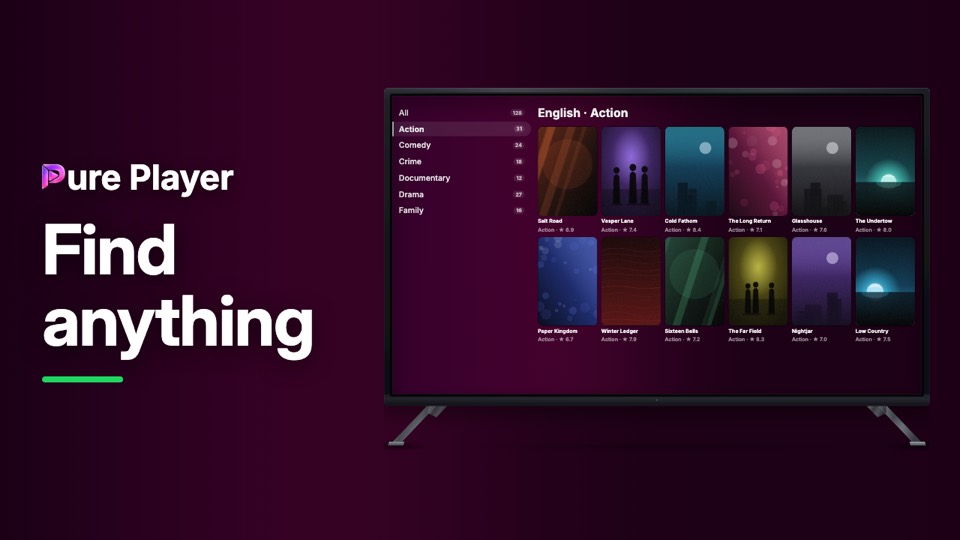
That match is what makes the rest possible: a genre list down the side, counts beside each one, and a shelf you can narrow instead of scroll.
Step by step
Open Movies or Series. The landing offers Browse by Language and Browse by Provider.
Pick one and the grid becomes that shelf.
The list down the left narrows it by genre, with a count beside each. All shows everything.
Each card carries its genre and its rating, which is what the match wrote back.
Nothing here is added to your playlist. Only the information about what is already in it.
PurePlayer installed, and your own playlist. Nothing is included with the app.
Questions
Where do the genres and ratings come from?
A playlist arrives as names and links. The app matches those against a metadata database it ships with, and writes back the genre and the rating you see on each card.
Can I narrow it down before the genres?
Yes. Start with a language or a provider, and that becomes your shelf. The genre rail then narrows what is already in front of you.