What is PurePlayer?
Everything the app does, in about two minutes.
PurePlayer is a media player for your own playlist. You bring the playlist, and the app turns it into something worth browsing, on your TV, your phone and your tablet at once. Set it up on one device and the rest follow, with the same playlist, the same history and the same lists.
Contents
Scan the QR code
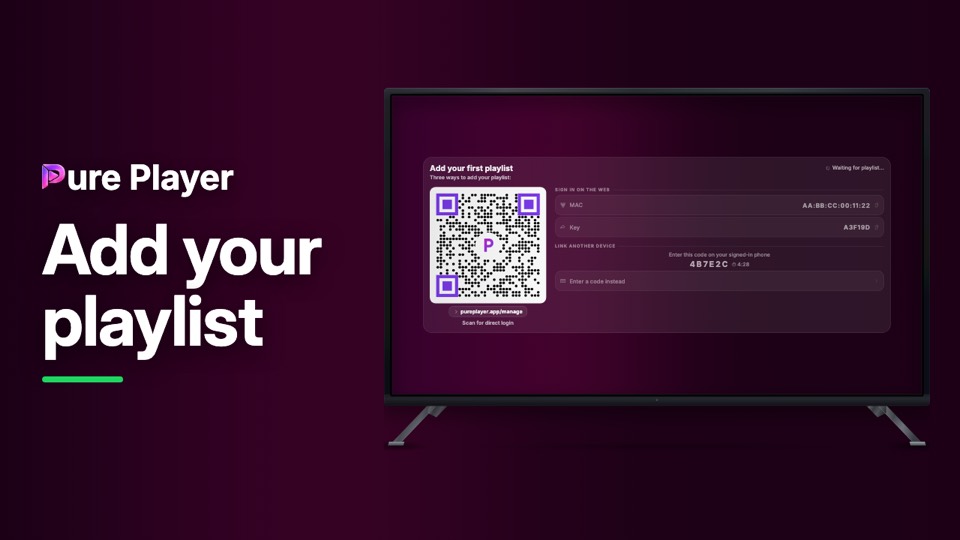
Point your phone at the code on the setup screen and you are signed in. Nothing to type, which helps a lot when your keyboard is a remote control.
Watch the full guideSign in on the web
Open pureplayer.app/manage in any browser and enter the MAC address and device key shown on your TV. Add your playlist there and it arrives on the TV by itself.
Link a device you already use
Your new device shows a short code. Type it on a device that is already running, and your playlist, history and lists copy across. The code changes every five minutes, so an old one is never left lying around.
Watch the full guideYour home gets smarter as you watch
You start with a clean grid of everything you have. After your first few plays, a trending banner and personal suggestions appear, and home arranges itself around what you actually watch.
Trending banner
What is popular right now, and that you already have in your playlist. Press play on the banner and it starts, with no searching first.
Continue Watching
Picks up exactly where you stopped, on any device. Start a film on the TV and finish it on your phone at the same second.
Recently Added
The newest content from your provider, from the last 90 days. Updated automatically every week, and you can refresh it yourself any time with Reload in Manage.
Because You Watched
Suggestions built from your own history, not from someone else's chart.
Classic Home
Prefer the plain grid? One switch in Manage turns the banner and the rows off for good.
Browse by language
Pick your language first, then go deeper inside it by category, by provider or by country.
Pin what you actually watch
Hold to pin a language, a group or a single channel, and it moves to the top. Your pins follow you to every device you have linked.
Watch the full guideSearch everything, or just your language
Search across all your channels, or narrow it to the language you are already in. You can filter by quality either way.
TV guide
See what is on now and what is coming next, right beside the channel.
Browse by language or by platform
With filters inside each one, for quality, genre and more. Pin your language so it always comes first.
Your progress is synced
Continue Watching and your position in an episode are the same on every device.
Auto play the next episode
On by default for a series. Turn it off in Settings if you would rather choose each time.
Pick your audio and subtitles
Choose the audio track in the player, and set a preferred subtitle language once in Settings.
Save anything, find it anywhere
One button on any film, series or channel. Your list is the same on every device you have linked.
Radio by country
Browse stations country by country, and keep the ones you like in Favourites.
Everything syncs in about a minute
Your history, lists, pins and progress travel between your devices on their own. There is no button to press.
Two devices, one setup
Link them with a short code, share the playlist, then accept it on the other side. Both devices need to be linked and on the same playlist to stay in step.
Watch the full guideYour data follows you
Reinstall the app, change TV or buy a new phone. Sign back in and your history and your lists come back from the cloud.
See and remove your devices
Manage shows every device on your account, and any of them can remove another.
Two themes
Cosmos for colour, and Midnight for easy viewing in a dark room, where your cursor is your torch.
Nine languages
English, French, Spanish, German, Arabic, Portuguese, Italian, Dutch and Turkish.
Your profile
An avatar and a name, so a shared TV still knows whose account it is.
Several playlists
Add more than one and switch between them. Any playlist can be locked with its own PIN, and the lock travels with it when you share it.
Hide Adult
One switch, and adult content disappears everywhere: Live TV, Movies, Series, Recently Added and your watch history. It is not hidden behind a warning, it is gone.
App Lock
A PIN on the whole app, asked for as soon as it opens. Useful on a family TV.
Watch the full guideReady to start?
Open the app, then add your playlist from pureplayer.app/manage, or just scan the code on your screen.
PurePlayer is a media player. You bring your own playlist. We do not supply or host any channels, movies, series or streaming content.